


CookShelf
3.857.00 Reviews
App Specs
- Version
- 1.95.0
- Updated On
- License
- Free
- Downloads
- 10,000+
- Developer
- CookShelf
- Categories
- Food & Drink
- Platform
- Android
Screenshots

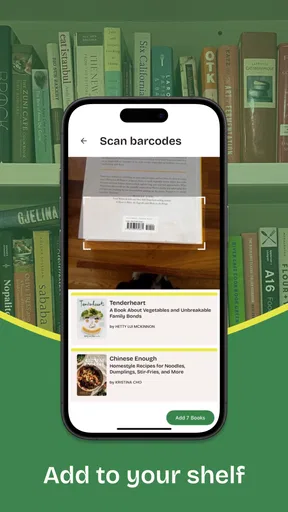

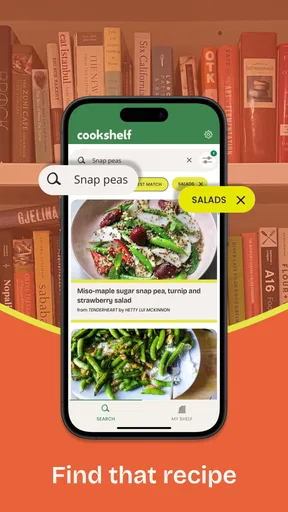
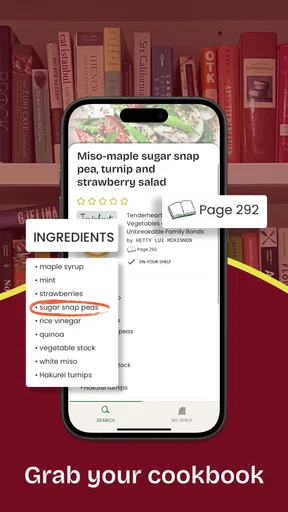

 Analysis by AppCompare
I often find myself choosing between two kinds of cooking tools: a general recipe site with endless results, or a personal collection that makes it easier to return to something I already like. CookShelf aims to sit between those habits, helping me search cookbooks while also pointing me toward recipes to try. That focus is useful if your cooking inspiration is scattered across books and saved ideas, though it matters what you expect from an app before making it part of your routine.
What the free access means in practice
CookShelf is a free Food & Drink app from CookShelf, with optional in-app purchases listed from $4.99 to $39.99 per item. I’d treat the free access as a way to try the core experience, then decide whether any paid option is worth considering for your own cooking habits. The listed price range alone doesn’t tell me which purchase suits which user, so I wouldn’t assume a particular feature requires payment without checking the choices in the app.
That distinction is important: free to install does not mean every possible use is necessarily included at no cost. If you mainly want a place to look through cookbooks and find ideas, start with the free experience and see whether it fits before spending anything. If you’re comparing it with a free recipe website, the useful question is not simply which has more recipes; it’s whether CookShelf makes your own cooking references easier to revisit.
Making a recipe library useful day to day
Ever found yourself sifting through countless recipes online, only to get overwhelmed by the sheer volume of options? CookShelf might just be the solution you need. This nifty app is like having a personalized cookbook right in your pocket, and I’ve gotta say, it’s pretty awesome. Let me walk you through what makes this app a game-changer for both novice cooks and experienced chefs alike.
Personalized Recipe Collection
One of the standout features of CookShelf is its ability to curate a personalized collection of recipes. When you first dive into the app, it prompts you to select your dietary preferences, favorite cuisines, and any specific ingredients you love or want to avoid. It’s like having a personal chef who knows exactly what you’re into!
The app learns from your interactions. The more you use it, the better it gets at suggesting recipes that align with your taste. It's almost like it reads your mind. For someone like me who gets easily bored with the same old meals, this feature is a lifesaver. I’ve discovered some amazing recipes I wouldn’t have tried otherwise.
Turning recipe finds into a shopping plan
The practical test for a recipe app is whether it helps after you’ve picked a dish, not just while you’re browsing. I’d use CookShelf’s grocery list as a bridge between deciding what to cook and actually getting the ingredients. Before heading to the store, I’d scan the recipe and mark pantry staples I already own; that small check can prevent duplicate purchases and keeps a shopping list focused on what’s genuinely missing.
Worth Reading Before You Choose

Flipboard Shows What News Apps Must Do Beyond the Feed

Switching to Android Auto Means Rethinking Your Driving Routine

Google Calendar Makes a Crowded Week Easier to Manage

Ludo King Makes the Most of the Minutes Between Plans

Baby Panda World Brings Quick Play to Modern Phones, but Its Game Library Feels Busy

ESPN’s Live Game View Makes Following Close Games Easier
For a realistic weeknight example, imagine I’ve chosen a new dinner recipe during a lunch break and need to shop on the way home. Adding its ingredients to the list in advance means I can check what is already in the cupboard and avoid relying on a half-remembered ingredient list at the supermarket. The section-based grouping is most valuable when a list contains items from several parts of a shop, although I’d still review it before leaving: recipe quantities and household needs can differ, and a digital list cannot decide what I have used up since I last checked.
Interactive Grocery List
Now, let’s talk about another cool feature—the interactive grocery list. Gone are the days of scribbling down ingredients on random scraps of paper. With CookShelf, you can add ingredients directly from a recipe to your shopping list with just a tap. The app even categorizes items by their section in the store, so you’re not zig-zagging across the aisles. It’s super efficient!
Plus, if you’re someone who tends to forget what you already have at home, the app allows you to mark items as "in pantry." This way, you don’t end up with five bags of flour when you only needed one.
Cooking with the phone beside you
Once I’m home, the step-by-step instructions and timers have a different job: keeping the cooking process organized. I’d open the recipe before starting, read through the steps, and set any timer at the point it becomes relevant. That is more dependable than trying to remember several timings while chopping or handling a hot pan. It also makes the app more useful for a beginner who benefits from a clear sequence rather than a dense block of recipe text.
There is a practical trade-off to cooking from a phone. A screen can be awkward to handle with wet or messy hands, and switching attention between the recipe and the food is not always ideal. I’d check the next step before getting deep into a task, then use the in-app timer for the moments when timing matters. The video element can help when a technique is easier to watch than to interpret from a sentence, but it does not replace reading the instructions and preparing ingredients first.
Step-by-Step Cooking Guidance
Cooking can sometimes feel intimidating, especially when trying out a new recipe. But CookShelf’s step-by-step guidance makes it easy-peasy. Each recipe is broken down into simple steps, and you can even set timers within the app for those crucial cooking moments. No more burnt cookies because you got distracted by your phone!
What I love most is the integrated video tutorials. For those of us who are visual learners, having a video to follow along with is incredibly helpful. It’s like having a cooking class right in your kitchen.
Finding recipes without losing your own taste
Personalized suggestions can be a useful nudge, but I wouldn’t let them make every decision. I’d treat them as prompts, especially when I want to escape a familiar dinner rotation, and then judge each recipe against the ingredients, time, and effort I actually have available. Choosing a cuisine or ingredient preference early can make discovery feel less random; revisiting those choices when my tastes change is a sensible way to keep recommendations relevant.
This is also where CookShelf differs from simply searching the web. A broad search is often better when I know exactly what I want, need a very specific dietary variation, or want to compare many versions of one dish. A cookbook shelf is more valuable when I want to return to trusted sources and browse with some continuity. CookShelf’s appeal, as its name suggests, is that it puts cookbook searching and discovery at the center rather than treating every recipe as a one-off result.
Community and Social Features
If you enjoy sharing your culinary creations with others, CookShelf has got you covered. The app offers a community space where users can share their tweaks to recipes, post photos of their dishes, and even follow their favorite cooks. It’s a great way to get inspired and pick up tips from fellow food enthusiasts.
You can also rate recipes and leave comments, helping others decide if a dish is worth trying. It’s a vibrant community that adds a social element to your cooking journey, making it more interactive and fun.
Who is likely to get value?
I’d recommend trying CookShelf if your main problem is not a shortage of recipes, but losing track of cookbooks and ideas you want to use. It is particularly suited to someone who likes cooking at home, enjoys discovering dishes outside a regular rotation, and appreciates having a shopping list and cooking guidance close to the recipe. A beginner may find the ordered instructions and timers reassuring, while a more experienced cook may value the organized way to turn inspiration into a meal.
It is less compelling if you want only a bare-bones recipe search, already have a system that keeps your recipes and shopping list together, or rarely cook from guided instructions. If you rely on highly specific dietary requirements, I’d inspect individual recipes rather than assume that a preference setting guarantees every result meets your needs. And if social posts are not part of how you cook, the community may be an extra rather than a reason to choose the app.
A measured view of the trade-offs
CookShelf’s feature mix sounds convenient, but several pieces of convenience depend on good habits. A pantry marker is only useful if I keep it current; a grocery list is only reliable if I check quantities and remove things I no longer need. Recommendations can also become less helpful if my preferences are too broad or no longer reflect what I want to eat. These are not reasons to avoid the app, but they do mean it works best as an organizer and cooking companion rather than a substitute for planning.
I’d also keep expectations grounded when comparing its community with a dedicated social food platform. Shared photos and comments can offer useful ideas, but they are not the same as a carefully tested recipe or personal advice tailored to my kitchen. When I need precision, I’d read the full method and use my own judgement; when I want inspiration, browsing other cooks’ tweaks can be a pleasant starting point.
Small habits that make it more useful
One simple workflow is to choose a recipe before shopping, check the pantry immediately, and then add only the missing items. That makes the list less cluttered and turns the app’s organization into a practical advantage. Another is to look over the whole method before cooking, rather than relying on each instruction as it appears; doing so helps reveal whether preparation and cooking steps overlap and when a timer will be needed.
I’d also use recipe discovery deliberately instead of scrolling whenever I have a spare moment. For example, I could browse when planning a different meal for the week, save an idea mentally by returning to its cookbook source, and then build a shopping plan around it. This gives recommendations a clear purpose and makes it easier to tell whether they are genuinely broadening my cooking or merely adding more options to an already long list.
What to expect before installing
CookShelf is rated for Everyone and has a 3.1 average from 37 ratings, with 22 written reviews and over 10K installs. I’d read that modest rating as a reason to approach it with sensible expectations, not as proof that it will or won’t suit me. The app is at version 1.34.0, was released on July 31, 2025, and requires Android 7.0 or later. Those details are useful when checking device compatibility, while the small number of ratings means individual experiences may not reflect every cooking style.
A common practical question is whether the app is worth trying before paying. Since it is free to install, I’d begin there, test the cookbook search and the parts of the workflow I would actually use, and only consider an in-app purchase if its terms and benefits make sense to me. Another is whether it replaces every other recipe source: I would not count on one app being ideal for every dietary need, cooking reference, and shopping habit. It can be a helpful home base without being the only place I look.
Final Thoughts
Overall, CookShelf is a fantastic app that brings convenience and creativity to your kitchen. Whether you’re looking to spice up your meal routine or need help organizing your grocery shopping, this app has got something for everyone. The personalized touch, combined with its user-friendly interface and social features, makes it a must-have for anyone who loves to cook or wants to start cooking more at home.
So, if you’re tired of the same old meals and are ready to explore new culinary horizons, give CookShelf a try. It might just become your new favorite cooking companion. Happy cooking!
My buy-or-skip verdict
I’d try CookShelf if cookbook search, fresh recipe ideas, and a connected grocery-to-cooking routine are all useful to me. The free starting point makes that a low-commitment decision, while optional purchases mean I’d check what I’m paying for before deciding the app offers enough extra value. If I mainly need a fast web search or already have a dependable recipe system, I’d stick with that instead. For home cooks who want discovery and organization in one place, it is worth a look—provided its recommendations and workflow suit the way they actually cook.
Pros
- Intuitive user interface for easy navigation.
- Extensive recipe collection with diverse cuisines.
- Customizable shopping list feature.
- Offline access to saved recipes.
- Built-in cooking timer for convenience.
Cons
- Requires account signup for full features.
- Limited free content without subscription.
- No integration with smart kitchen devices.
- Occasional ads in the free version.
- Lacks meal planning functionality.
FAQs for CookShelf
What is CookShelf and what can I do with it?
CookShelf is a versatile app designed for culinary enthusiasts and home cooks. It offers a comprehensive platform to store, organize, and share your recipes. With CookShelf, you can explore new recipes from around the world, customize your favorite dishes, and create shopping lists based on your meal plans.
Is CookShelf free to use, and are there in-app purchases?
CookShelf is free to download and provides access to a wide range of basic features. However, it offers in-app purchases for premium features, such as exclusive recipes, advanced meal planning tools, and an ad-free experience. Users can choose to upgrade to enhance their cooking experience.
How user-friendly is the CookShelf interface?
CookShelf boasts a highly user-friendly interface, making it easy for both beginners and experienced cooks to navigate. The app provides intuitive categorization and search functions, allowing users to find recipes quickly. It also includes step-by-step guides and video tutorials to simplify the cooking process.
Can I share my recipes with others using CookShelf?
Yes, CookShelf allows users to share their own recipes with others. You can easily upload your recipes, complete with photos and instructions, to the CookShelf community. Additionally, you can share links to your recipes via social media platforms or directly with friends and family.
Is CookShelf available on both Android and iOS devices?
CookShelf is available for both Android and iOS platforms, ensuring that users across different devices can enjoy its features. The app is regularly updated to ensure compatibility and to introduce new features, making it a reliable choice for all mobile users.


